





DATA
HANDLING PROJECT

COMPUTER
EXPERIENCE
OF PUPILS
ENTERING
YEAR 7
Page 1
Page 2
Page 3
Page 4
Page 5
Mark scheme
Close
 |
Program Helpsheets |
 |
Back
to GCSE ICT |
PROCESSING THE RESULTS |
- Print a copy of the sample questionnaire and label it 4 - The Questionnaire.
- Now search the database to find out how many pupils ticked each answer in fields Q1, Q2 and Q3 as follows:
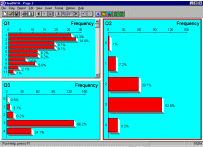 Select a
new report page and insert a graph (bar chart)
for Field Q1.
Select a
new report page and insert a graph (bar chart)
for Field Q1. - Format the graph settings to show percentages on each bar.
- Format the graph settings to put the numbers on the vertical axis into numerical order.
- Insert a graph (bar chart) for Field Q2 and repeat the above formatting. Then do this again for Field Q3.
- Fill in the answers for these fields on your printed questionnaire.
- Save all your work then print this page and label it 5 - Bar Charts
- In fields Q4 to Q8, more than one answer was possible. For example you might get entries like 137, 17, 57 and so on. These are quite meaningless as real numbers, they are just codes or text. We want to find all the records which contain a 0, a 1, or a 2 and so on, in order to continue filling in the totals for each answer on the questionnaire.
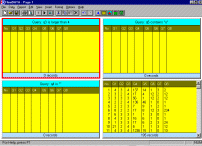 Select the
report page where you inserted four query tables
earlier. (These should now be empty, if not then
go back and edit the data to correct the errors,
or check that you have loaded the correct file).
Select the
report page where you inserted four query tables
earlier. (These should now be empty, if not then
go back and edit the data to correct the errors,
or check that you have loaded the correct file).- Format a query for each
possible response in field Q4:
Query Q4 contains "0"
Query Q4 contains "1", then "2" and so on.
Don't forget to fill in the answers on your questionnaire. - Continue this for each of the remaining fields Q5-Q8. As this is quite a repetitive chore you could share the load with someone else.
- Now lets get some more complex answers from the survey as a whole. Format a new query (one in each of the four tables) to ask the following questions. You will need to look very carefully at your questionnaire to decide which field or fields to select and how to phrase your query. Check the result that you get in the table to make sure that it actually does answer the question.
- How many pupils have got a computer at home?
- How many pupils possess a printer at home?
- How many pupils have a printer and use it to produce homework?
- How many pupils say that they have a word processor but (and) do not have a printer?
- Save all your work, then print this page.
- Label your printout 6 - Survey results and write the above questions and answers on the printout to explain each query you have made.


Page last updated 23/05/2003 © Copyright, I.D.Lee,
Didcot Girls' School.
All rights
reserved. The original material provided on this site may
not be copied or redistributed without written consent
from the school. But please feel free to add a link to this page on your
own website if you find it useful.


