





DATA
HANDLING PROJECT

COMPUTER
EXPERIENCE
OF PUPILS
ENTERING
YEAR 7
Page 1
Page 2
Page 3
Page 4
Page 5
Mark scheme
Close
 |
Program Helpsheets |
 |
Back
to GCSE ICT |
CHECKING FOR ERRORS |
The complete database for the whole year group has already been typed in for you and saved as a file called Y7dbase. The next step is to make sure that all the data has been correctly entered into the computer before you start to process it, analyse it and make conclusions from it.
- Open the file called Y7dbase by clicking on the following link; choose to "Open it" or "Run it" when asked: (this may not work if your data handling program is already open)
| Y7dbase.fdd |
FlexiData helpsheet |
- Edit the data file and then sort the records into numerical order of Record Number.
- How many records are there? Does this match the highest record number entered in the data? Look through the sorted database for a duplicated record number and delete this record completely from the database.
- Save the corrected data.
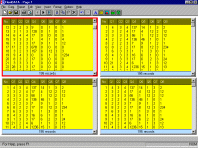
- Start a report page and insert four tables, which show all of the fields.
- Format a query to track down the following kinds of possible errors. (Do each one in a separate table). Tip: there are three answers for each correct query (so you will know when you have got them right).
- In field Q3, some out-of-range numbers (higher than 4) have been entered.
- In field Q5, the letter O has sometimes been typed (instead of the number Ø, zero).
- In field Q4, some entries have been left empty (no value at all).
- Print this page, label it 3 - Validation Checks and write on it the 3 queries translated into questions in normal English.
- Edit the data to correct all of the errors shown in your printout. Find each record with an error (you now know the record number) and correct it as follows -
- In field Q3, delete back to the first digit only (can you see why the mistake was made?)
- In field Q5, delete the letter O or o and enter the value Ø (zero).
- In field Q4, enter the value Ø (zero) rather than leaving an empty space.
- Look again at your report page and check that all the query tables are now empty.
- Save all and use the filename MyReport when prompted. Remember to always load this one file for all future lessons on this project.
- Many of these errors could have been prevented when the data was entered into the database. Edit the fields and find out how this could be done. Describe what you could have done by writing on your printout.


Page last updated 23/05/2003 © Copyright, I.D.Lee,
Didcot Girls' School.
All rights
reserved. The original material provided on this site may
not be copied or redistributed without written consent
from the school. But please feel free to add a link to this page on your
own website if you find it useful.


